
Nobody has to open the dashboard
Every morning the numbers land in Slack, email or a text, with a short write-up of what changed. Set an alert on any number and you get a message when it crosses the line you set.
Blended CAC and ROAS, daily
ActiveSchedule
Every day at 6:55 AM
Send to
Sections
- Blended CAC and ROAS
- By platform
- By traffic source
- Daily

CerebroApp6:55 AM
Fernhouse · Blended CAC and ROAS
Fernhouse Home Goods · Media buying
Are we on target this morning?
Blended CAC, 7D
$38.40
$4.40 over $34 target
New-customer ROAS
1.42
target 1.55
Spend, 7D
$186.2k
▴ 6%
New customers, 7D
4,849
▾ 3%
Blended CAC vs. target
Warehouse, first-party attribution · updated 6:50
Thread · AI summary
- • CAC is $38.40 against a $34 target. Most of the gap is one platform's prospecting campaigns.
- • Two campaigns are under $30. Moving budget there would bring the blend back to about $35.
Slack, email, text or a webhook
Slack posts arrive as images with an Open in Cerebro button. Email and text carry the same images. A webhook sends the write-up, the images and a link to the live page to another system.
Fulfillment scoreboard · weekdays 3:00
Cerebro Analytics to Operations lead3:00 PM
- 23 orders and 81 units shipped so far today.
- 9 orders are overdue, the oldest since June 18.
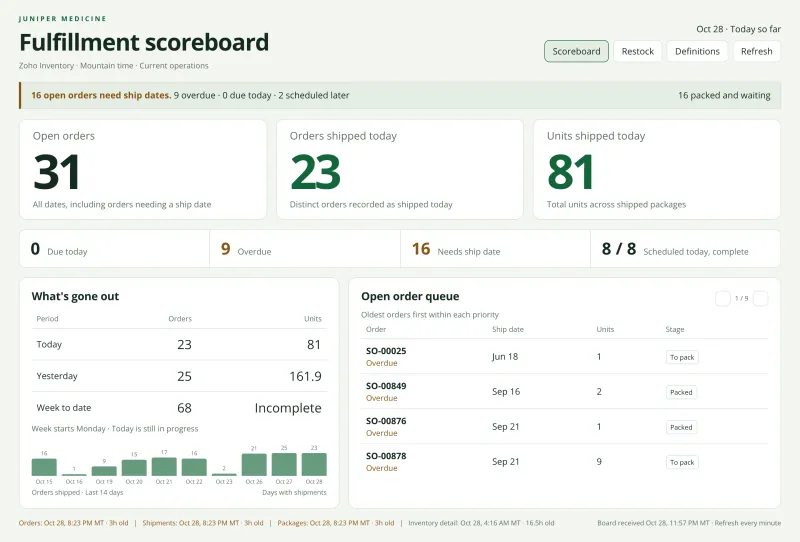
A fulfillment team emails its scoreboard to the operations lead every weekday afternoon.
Cerebro
Text message · Today 5:00 PM
Cedar Point Residential · Juniper Flats · 212 units
Operating pulse
Physical occupancy
93.4%
▴ 0.8 pts vs last month
Leased
95.1%
▴ 1.2 pts
Total delinquency
$18,420
▾ 12% vs last month
NOI, month to date
$142.8k
3.1% above budget
Yardi, QuickBooks and budget sheet · captured today 6:00
Juniper Flats: 93.4% occupied, $18,420 delinquent. Open in Cerebro for the vacancy list.
A regional manager at Cedar Point Residential gets one property's numbers by text at the end of the day.
Daily top accounts
POSThttps://ops.keystone.example/cerebro
Content-Type: application/json
{
  "automation_id": "auto_7f21",
  "run_id": "run_0b9c",
  "report_markdown": "12 accounts quiet…",
  "artifacts": [
    { "type": "image", "url": "…/calls.png" }
  ],
  "deep_link_url": "https://app…/d/…"
}
Keystone Office Supply posts the reps' daily call list to its own system at 7:45 each weekday.
Send the section people read, not the whole page
Schedule a whole dashboard, one tile, or specific tabs and sections of a custom dashboard. Each one arrives as a clean image sized for the channel, so a phone screen shows the chart and not a shrunken page.
Each automation also picks where its link goes: the live dashboard, the assistant thread that wrote the summary, or nowhere.
- Hourly, daily, weekdays, weekly or a cron expression
- Several channels per automation
- Images only, or images with a write-up
Portfolio NOI, Monday review
ActiveSchedule
Weekly · Monday at 8:00 AM
Send to
Sections
- Where NOI comes from
- Repairs per unit
- Portfolio snapshot
- Budget variance
A summary that agrees with the chart
Turn on the write-up and the analyst reads the same data the images show, then writes a short note. In Slack it goes in the thread under the post, so the channel stays readable.
Write a prompt for this automation or pick one from your Prompt Library. Tell it who reads the post and what they decide, and it writes for that person.
Write-up
Posts in the threadThe media buyers read this at 7. In one line, say whether blended CAC and new-customer ROAS are on target. Then say which platform moved them and where to shift budget today.
Preview
Off target. CAC is $38.40 against $34 and ROAS is 1.42 against 1.55. Social A drove most of it. Shift budget to the two search campaigns under $30.
Manage it like a report your team depends on
Test send
Run history
Pause, clone, archive
Owner's access
Slack channels you're in
Share and hand off
Data alerts
From the CLI or your agent
Automations FAQ
Can an automation alert me when a number crosses a threshold?
Yes. Set a data alert on any number on a dashboard. It sends a message when the value crosses a line you pick, or every time it moves by a set step, through the same Slack, email, SMS and webhook delivery. Type it as a sentence, like tell me when revenue passes 140,000, or click Alert me on a chart.
Does the AI write-up see the same numbers as the images?
Yes. The write-up is built from the data behind the tiles in that run, so the text and the charts agree. You can skip the write-up and send images only.
Who can I send to?
Slack channels you belong to, any email address, phone numbers for text messages and any URL that accepts a webhook. One automation can send to several of these at once.
Can I run a saved prompt on a schedule?
Yes. Pick a prompt from your Prompt Library as the write-up, or write one just for this automation. The weekly leasing review your team runs by hand can run itself on Monday at 8.
What happens if someone loses access to a data source?
Access rules are checked each time the automation runs. If the owner can no longer query a source, that run won't include it.
The rest of the analyst
What customers say
“Everything in there is what we've been screenshotting for our weekly one-on-ones. It's going to drastically improve the meeting and cut the time spent putting it together.”
“This is saving me a minimum of 1–2 hours every day. A value that's beyond $$$ since I now get at least an extra third of my day back.”
“This tool generates detailed reports in minutes, what used to take hours. Even with a rough prompt, the output is tremendous: highly reliable and insightful.”
 Chad BuckendahlChief Data & Analytics Officer, Truly Free Home
Set up tomorrow morning's report today
Connect a source, build the dashboard and schedule it to the channel your team already reads. Free to start.